8 channels · Voltage waveforms · UDP data · TF recording
ZMHADC-0816 Eight-Channel Voltage Acquisition Terminal
Acquire eight voltage channels with signed 16-bit sample data and real-time rates up to 200kSPS per channel, plus selectable ranges, UDP waveforms, Web preview and TF recording.
Tax-inclusive reference prices in CNY. Negotiable; the quotation reflects the selected configuration, quantity and delivery requirements. All products carry a 3-year warranty.
For a complete system, include the power supply, sensors, communication access and platform deployment in your enquiry.
At a glance
Channels8 voltage inputs
Real-time rates40/100/150/200kSPS per channel
Input ranges±5V or ±10V, common to all channels
Sample dataSigned 16-bit raw values
Product overview
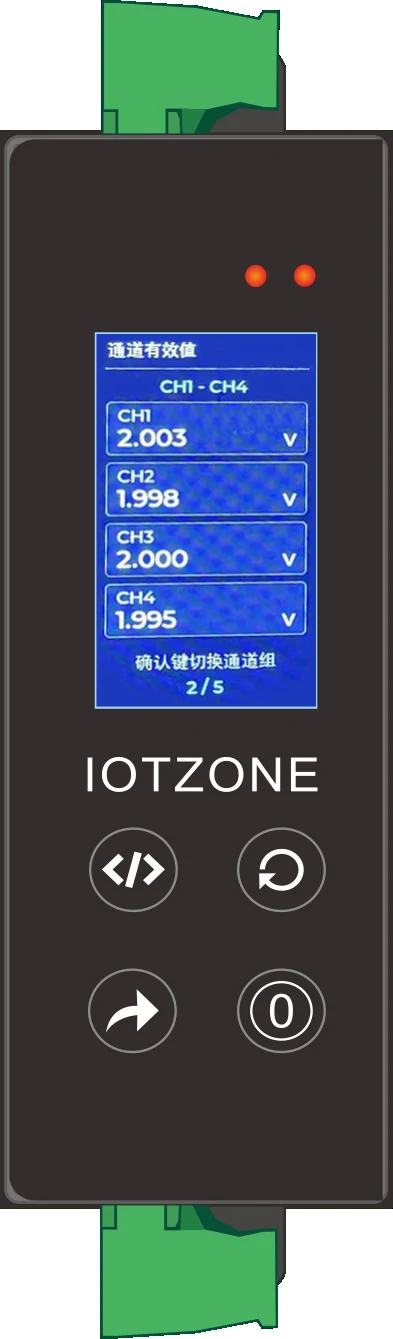
ZMHADC-0816 serves equipment testing and multi-point voltage analysis. The LCD displays status and RMS values, the Web interface provides waveform previews, and the Windows application receives original samples for analysis.
Functions and integration
Original real-time samples
Select 40, 100, 150 or 200kSPS per channel and send eight-channel data to the host through Ethernet UDP.
Common input range
Choose ±5V or ±10V for all channels together. Acquisition inputs are for compatible signals, not direct mains connection.
Preview versus analysis
Web previews use reduced data. Use host-received original samples for spectral analysis, edge observation and raw-data storage.
Local recording
FAT32 TF cards store .ZRW records. The recording limit is 40kSPS; continuous performance depends on the storage card and operating conditions.
Applications and operating workflow
Equipment signal tests
Observe multiple voltage signals and retain original data for engineering analysis.
Test benches
Match range, sample rate, network throughput and storage to the test objective.
Field recording
Review local status before selecting host streaming or TF recording for a task.
Technical data and interfaces
Channels
8 voltage inputs
Real-time rates
40/100/150/200kSPS per channel
Input ranges
±5V or ±10V, common to all channels
Sample data
Signed 16-bit raw values
Transport
Ethernet UDP
Interfaces
LCD, Web preview and Windows application
TF recording
Up to 40kSPS; FAT32; .ZRW
Selection and system combinations
Plan multi-channel voltage acquisition by signal range, sampling requirements and the host system. Frequency counting and energy metering are different measurement tasks with separate device choices.
Separate frequency, duty-cycle and pulse-count requirements for periodic and counting signals. Voltage waveform acquisition and equipment contact-state acquisition use their respective modules.
Use this system for centralized three-phase power measurements. Separate whole three-phase monitoring, multiple single-phase branch metering and power-quality analysis by distribution wiring and measurement boundaries.
Use the LCD for sampling status and channel RMS values, the browser for a reduced waveform preview and operating status, and the Windows host for UDP original-sample analysis. Field staff can check values and state while analysis staff work with the original samples. Use original data for fast edges or narrow pulses; the preview is intended for quick inspection.
ZMHADC-0816 terminal exterior and four-channel RMS display
02
Plan streaming and TF recording as separate modes
Real-time network acquisition offers 40, 100, 150 or 200kSPS per channel. TF recording is limited to 40kSPS and pauses UDP streaming while recording. Choose streaming for continuous host data or FAT32 TF storage and .ZRW files for standalone records. The host application opens TF records and saves computer-captured data as .adhw files, supporting task-based original-data archives.
03
Review eight-channel waveforms with numerical statistics
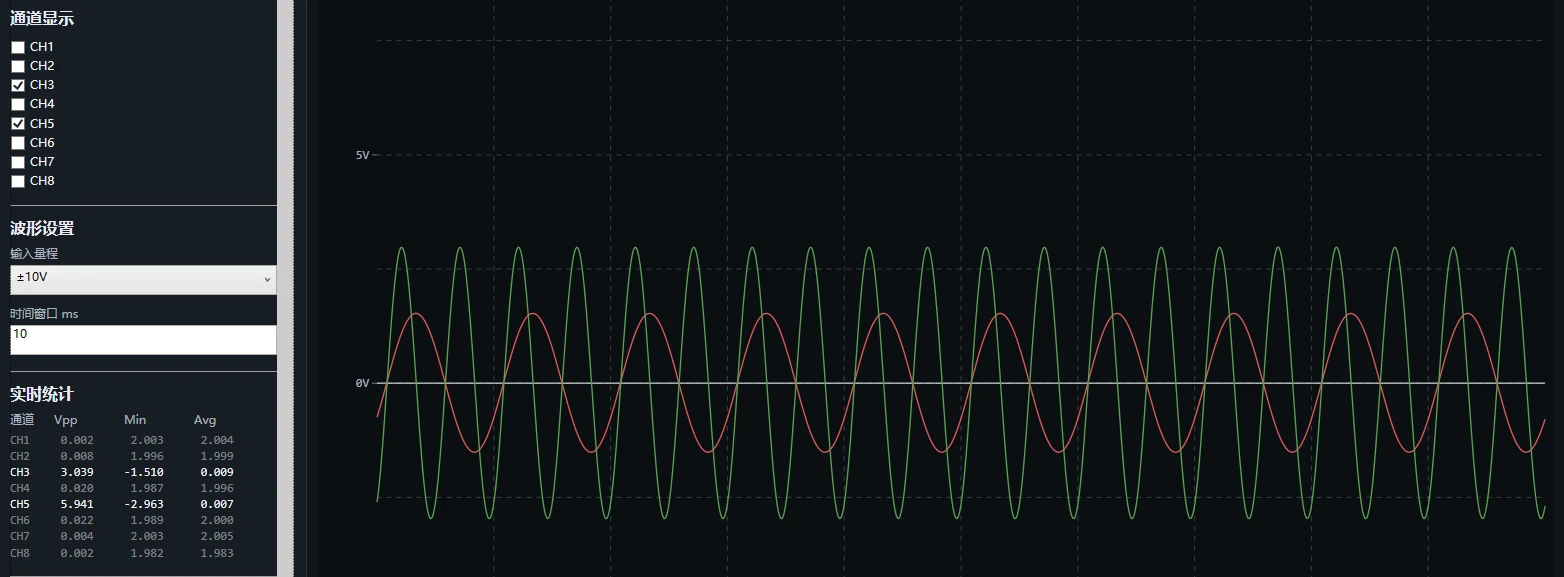
Select visible channels and the time window in the host application, then review peak-to-peak, minimum and mean values alongside filter windows and FFT analysis. Record signal sources and connections so different operating conditions can be compared using the same sampling settings. The ±5V or ±10V range applies to all eight channels together and should match the signal amplitude and analysis task.
ZMHADC-0816 host application showing original waveforms and statistics
04
Organize networking and time around the test task
Connect the terminal to a test computer or switch using Ethernet, with static addressing or DHCP and a UDP destination matching the receiver. NTP supports a local server or external domain for consistent time in test networks. Link each development, production or field-recording task to its channel list, sample rate, range and files so replayed waveforms retain their test context.
Selection questions
Why is there no live UDP data during recording?
TF recording pauses UDP streaming by design. Select host streaming or standalone TF recording for the task, then replay the corresponding recorded file in the host application.
Can existing test software receive the data?
The UDP original-data protocol can be adapted to MATLAB, LabVIEW or project test software. The receiver must map the channel layout, sample rate, sample format and recording requirements.
Frequently asked questions
Can TF recording run at 200kSPS?
No. Real-time network acquisition and TF recording have different limits; TF recording is limited to 40kSPS.
Does 16-bit data mean 16 effective bits?
No. The sample format does not establish measurement accuracy or effective resolution.
Can channels have different ranges?
The input range is selected for all eight channels together.
Request product selection assistance, interface documentation and system integration support with your equipment list, channel count, network conditions and deployment requirements.